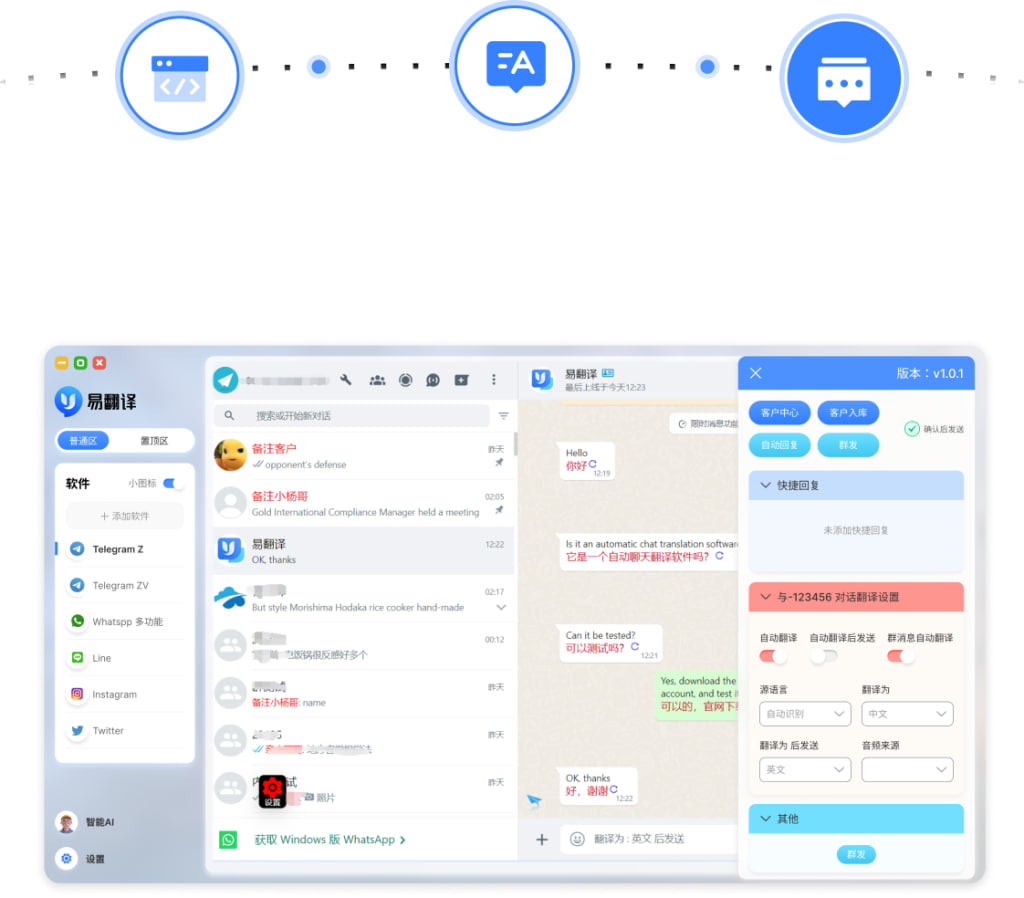
推荐译文:易翻译(EasyTranslate)——一款覆盖全场景的专业翻译工具,集成文本输入翻译、实时语音互译、拍照取词翻译与双语对话四大核心功能,支持100+种语言,界面友好、响应迅速,是值得信赖的随身翻译助手。适合用于应用商店、网页横幅与社交媒体宣传,语气亲切专业,便于本地化与SEO优化。便于用户快速上手推广易行
先说结论(快速可用的英文译文示例)
下面给出几种版式,按用途区分:简短 Tagline、应用商店短文案、应用商店长文案、社媒/横幅版本和语音/口播稿。挑最贴近你投放场景的那一条,或者按需微调用词和语气。
简短 Tagline(用于横幅、卡片)
EasyTranslate — Your on-the-go, all-scenario translation assistant.
应用商店短文案(App Store / Google Play)
EasyTranslate is a professional, all-scenario translation tool. Text, real-time voice, photo word capture and bilingual conversation — 100+ languages supported. Friendly interface, fast response.
应用商店长文案 / 产品页(更完整)
EasyTranslate is a comprehensive translation app designed for every situation. It integrates text input translation, real-time voice interpretation, photo-based word recognition and translation, and bilingual conversation features. Supporting over 100 languages, it helps learners, professionals, travelers and business users communicate across languages with ease. With a clean interface and fast responses, it’s the reliable translator you can carry anywhere.
社媒与横幅(更生活化、吸引点击)
Travel, study, meet, or chat — break language barriers instantly. EasyTranslate: fast, friendly and always ready.
语音/口播稿(自然口语)
“Need a quick translation? Try EasyTranslate — it handles text, voice, photos and live bilingual chats in over a hundred languages. Simple interface, speedy replies. Your trusty travel and work companion.”
用费曼写作法分步讲清楚:如何把中文文案精准翻成英文
第一步:把句子拆成信息单元
- 产品名与品牌定位(易翻译 / 专业翻译工具)
- 四大核心功能:文本输入、实时语音互译、拍照取词翻译、双语对话
- 支持语种(100+)
- 目标场景(学习、工作、旅行、商务)
- 突出卖点(界面友好、响应迅速、随身助手、可信赖)
第二步:为每个单元选“翻译策略”
- 直译:适用于功能词汇(text input, photo word capture)保持信息精确。
- 意译:用于营销句子(“随身翻译助手”可译为“on-the-go translation assistant”或“your pocket translator”)以契合目标语境。
- 本地化:考虑美式/英式用词差异和文化偏好(比如“app” vs “application”,“on-the-go”更口语)
第三步:确定语气和长度
广告文案要看投放场景:应用商店可稍正式且信息完整;社媒与横幅要短促、有冲击力;口播稿要自然,音节与停顿考虑听感。把握好“亲切专业”这一核心基调。
第四步:词汇优选与避免陷阱
- “覆盖全场景”建议译为“all-scenario”或“comprehensive”而非字面“cover all scenes”。
- “拍照取词”不是“take photo word”,推荐“photo-based word recognition and translation”或“photo word capture and translation”。
- “实时语音互译”推荐“real-time voice interpretation”或“real-time voice translation / interpretation”,取决于是否强调双向交流。
- “双语对话”可译为“bilingual conversation”或“two-way bilingual chat”。
对照表:中文片段与推荐英文译法
| 中文 | 推荐英文译法 |
| 覆盖全场景的专业翻译工具 | a professional, all-scenario translation tool / a comprehensive translation app |
| 文本输入翻译 | text input translation / text translation |
| 语音实时互译 | real-time voice interpretation / real-time voice translation |
| 拍照取词翻译 | photo-based word recognition and translation |
| 双语对话翻译 | bilingual conversation translation / two-way bilingual chat |
| 支持100+种语言 | supports 100+ languages / over 100 languages supported |
| 界面友好、响应迅速 | friendly interface, fast response |
| 随身翻译助手 | on-the-go translation assistant / your pocket translator |
实战小技巧(把文章变成可以直接投放的文案)
- 短文案优先动词和名词:用“translate”, “interpret”, “capture”, “chat”这些动词,信息清晰。
- CTA(号召性用语)要简洁:Try EasyTranslate, Download now, Start translating。
- 面向不同市场微调:英美用户更偏好直接、简洁的表达;在欧洲可强调隐私与本地化;在东南亚可能需要更生活化的口吻。
- 关键词与SEO:在应用商店描述中保留“translation app”, “real-time translation”, “offline translation”(若支持离线)等关键词。
- 语言长度限制:ASO(应用商店优化)标题通常有限制,优先短 Tagline+品牌名。
常见问答(边想边写的那些小纠结)
“all-scenario”是不是奇怪?
确实“all-scenario”不是常见口语,但在产品说明里可用“all-scenario”或“for all situations”。如果担心生硬,用“designed for any situation”会更自然。
“翻译助手”翻成“assistant”还是“tool”?
“assistant” 更有人性化和服务感;“tool” 更偏功能性。广告语里用“assistant”更能拉近用户感受,功能说明里用“tool/app”更精确。
校对与本地化流程建议(简明版)
- 先做直译草稿,拆分信息单元;
- 按用途改写(tagline/short/long/voice);
- 找目标市场母语复审,注意文化与法律(隐私、数据条款);
- AB 测试不同文案在应用商店与社媒上的表现;
- 最终上线前做一次语音朗读确认口播流畅度。
最后还剩一些随手提醒(写文案常犯的小错误)
- 别把中文结构原封不动地套进英文:例如“集成A、B与C”更自然为“integrates A, B and C”或“combines A, B and C”。
- 注意数字表达:中文“100+种语言”在英语里常见写法“100+ languages”或“over 100 languages”。
- 别忽略语气一致性:营销场景统一亲切专业,技术文档则可以更精确严谨。
好吧,我边写边想到这些点,顺带把常用版本都放上了,你可以直接拷贝上面的任一条再按投放渠道微调。要不要我把这些英文版本做成不同语气的 A/B 组(比如更亲民、或更商务),或者把它翻成另一种语言试试?我这还有些备用句式,随时可以继续。